Running AI agents in production is different from calling an API in a notebook. You need capacity planning, authentication that doesn't involve hardcoded keys, graceful handling of rate limits, and infrastructure that scales with demand. Azure AI Foundry provides the foundation — but the documentation assumes you'll figure out the production patterns yourself.
This guide covers the complete setup: provisioning Azure AI Foundry with Terraform, configuring model deployments with appropriate capacity, authenticating from containerized applications using managed identity, and orchestrating agent workloads through BullMQ job queues. Every code example runs in production.
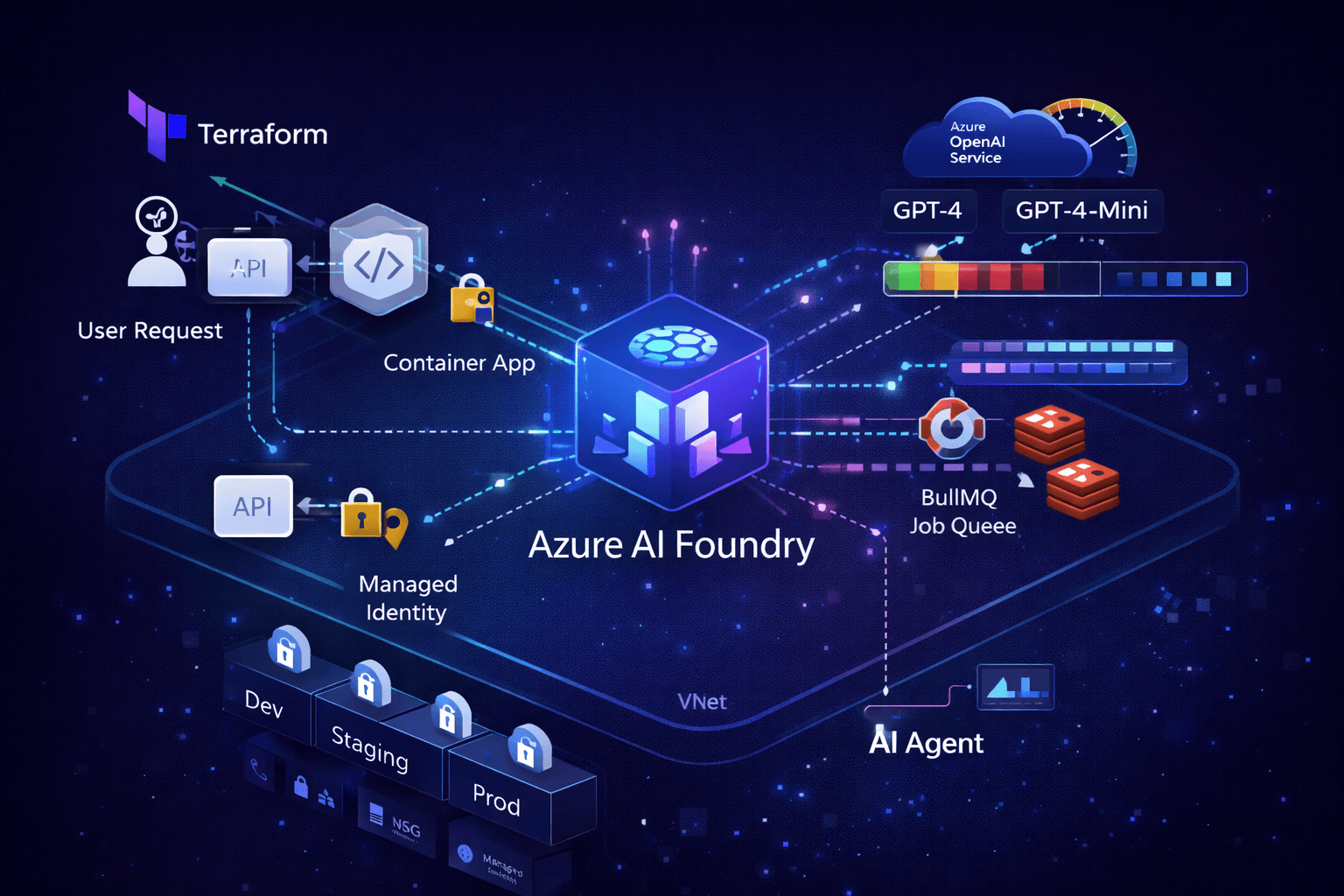
 Azure AI Foundry architecture diagram showing Terraform provisioning, Container Apps with managed identity, AI project with model deployments, and BullMQ job orchestration
Why Azure AI Foundry
Before diving into implementation, understand the architectural decision. Azure AI Foundry (formerly Azure AI Studio) provides:
- Unified endpoint for multiple model providers (OpenAI, Meta, Mistral, Cohere)
- Managed capacity with predictable pricing through PTU (Provisioned Throughput Units)
- Enterprise security with VNet integration, private endpoints, and managed identity
- Built-in agent capabilities with the Azure AI Agent Service
The alternative — calling OpenAI directly — works for prototypes but lacks enterprise controls. Azure AI Foundry wraps the same models with Azure's security and compliance guarantees.
Infrastructure Setup with Terraform
Azure AI Foundry infrastructure can be fully provisioned with Terraform using the azurerm provider. The official Terraform documentation covers the foundational setup, which we extend here with production patterns.
AI Foundry Hub and Project
Azure AI Foundry uses a hub-and-spoke model. The hub contains shared resources (compute, storage, key vault), while projects contain model deployments and agent configurations:
# AI Foundry Hub - shared infrastructure
resource "azurerm_ai_foundry" "hub" {
  name                = "${var.prefix}-${var.environment}-ai-hub"
  resource_group_name = azurerm_resource_group.main.name
  location            = azurerm_resource_group.main.location

  storage_account_id  = azurerm_storage_account.ai.id
  key_vault_id        = azurerm_key_vault.main.id

  identity {
    type = "SystemAssigned"
  }

  # Network isolation for production
  public_network_access = var.environment == "prod" ? "Disabled" : "Enabled"
}

# AI Foundry Project - contains model deployments
resource "azurerm_ai_foundry_project" "main" {
  name               = "${var.prefix}-${var.environment}-ai-project"
  ai_foundry_id      = azurerm_ai_foundry.hub.id
  location           = azurerm_resource_group.main.location

  identity {
    type = "SystemAssigned"
  }
}
Azure OpenAI Service and Model Deployment
The AI Foundry project connects to an Azure OpenAI resource for model access:
# Azure OpenAI Service
resource "azurerm_cognitive_account" "openai" {
  name                = "${var.prefix}-${var.environment}-openai"
  resource_group_name = azurerm_resource_group.main.name
  location            = var.openai_location  # Not all regions support all models
  kind                = "OpenAI"
  sku_name            = "S0"

  identity {
    type = "SystemAssigned"
  }

  # Network rules for production
  network_acls {
    default_action = var.environment == "prod" ? "Deny" : "Allow"
    virtual_network_rules {
      subnet_id = azurerm_subnet.container_apps.id
    }
  }
}

# Model deployment with capacity planning
resource "azurerm_cognitive_deployment" "gpt4" {
  name                 = "gpt-4o"
  cognitive_account_id = azurerm_cognitive_account.openai.id

  model {
    format  = "OpenAI"
    name    = "gpt-4o"
    version = "2024-11-20"
  }

  sku {
    name     = "GlobalStandard"
    capacity = var.gpt4_capacity  # Tokens per minute in thousands
  }
}

resource "azurerm_cognitive_deployment" "gpt4_mini" {
  name                 = "gpt-4o-mini"
  cognitive_account_id = azurerm_cognitive_account.openai.id

  model {
    format  = "OpenAI"
    name    = "gpt-4o-mini"
    version = "2024-07-18"
  }

  sku {
    name     = "GlobalStandard"
    capacity = var.gpt4_mini_capacity
  }
}
Capacity Planning
Capacity is measured in thousands of tokens per minute (TPM). The capacity value in Terraform directly maps to TPM limits:
# environments/dev.tfvars
gpt4_capacity      = 30   # 30K TPM - sufficient for development
gpt4_mini_capacity = 60   # 60K TPM - higher for bulk operations

# environments/prod.tfvars
gpt4_capacity      = 150  # 150K TPM - production workload
gpt4_mini_capacity = 300  # 300K TPM - high-volume tasks
Tip: Azure also enforces Requests Per Minute (RPM) limits alongside TPM. A deployment with 150K TPM typically allows ~900 RPM. For agent workloads with many small requests, RPM often becomes the bottleneck before TPM.
Start conservative and scale based on actual usage. Azure OpenAI offers two billing models: Standard deployments use pay-per-token pricing where you only pay for actual consumption, while Provisioned Throughput Units (PTU) are billed hourly regardless of usage. For most applications, Standard deployments with adequate TPM capacity provide the best balance of cost and performance — you get predictable rate limits without paying for idle capacity. PTU deployments make sense only when you need guaranteed throughput for latency-sensitive workloads and can consistently utilize the provisioned capacity.
When to consider PTU: If your application consistently uses 80%+ of provisioned Standard capacity during business hours, PTU may offer cost savings. Calculate:
(hourly_PTU_cost × hours) vs (token_price × average_daily_tokens). PTU also guarantees latency SLAs that Standard deployments don't provide.
Managed Identity for Container Apps
The Container App authenticates to Azure OpenAI using managed identity — no API keys to rotate or leak. User-assigned identities are preferred over system-assigned because they can be pre-created and assigned RBAC roles before the Container App exists:
# User-assigned managed identity
resource "azurerm_user_assigned_identity" "api" {
  name                = "${var.prefix}-${var.environment}-api-identity"
  resource_group_name = azurerm_resource_group.main.name
  location            = azurerm_resource_group.main.location
}

# Grant Cognitive Services User role to the identity
resource "azurerm_role_assignment" "api_openai" {
  scope                = azurerm_cognitive_account.openai.id
  role_definition_name = "Cognitive Services OpenAI User"
  principal_id         = azurerm_user_assigned_identity.api.principal_id
}

# Assign identity to Container App
resource "azurerm_container_app" "api" {
  name                         = "${var.prefix}-${var.environment}-api"
  container_app_environment_id = azurerm_container_app_environment.main.id
  resource_group_name          = azurerm_resource_group.main.name
  revision_mode                = "Single"

  identity {
    type         = "UserAssigned"
    identity_ids = [azurerm_user_assigned_identity.api.id]
  }

  template {
    container {
      name   = "api"
      image  = "${azurerm_container_registry.main.login_server}/api:${var.image_tag}"
      cpu    = var.api_cpu
      memory = var.api_memory

      # Environment variables for SDK configuration
      env {
        name  = "AZURE_OPENAI_ENDPOINT"
        value = azurerm_cognitive_account.openai.endpoint
      }

      env {
        name  = "AZURE_CLIENT_ID"
        value = azurerm_user_assigned_identity.api.client_id
      }

      env {
        name  = "AZURE_OPENAI_DEPLOYMENT_GPT4"
        value = azurerm_cognitive_deployment.gpt4.name
      }

      env {
        name  = "AZURE_OPENAI_DEPLOYMENT_GPT4_MINI"
        value = azurerm_cognitive_deployment.gpt4_mini.name
      }
    }
  }
}
TypeScript SDK Setup
Dependencies
Install the Azure AI packages:
pnpm add @azure/openai @azure/identity
Client Configuration with Managed Identity
The SDK automatically uses managed identity when running on Azure:
// lib/azure-openai.ts
import { AzureOpenAI } from '@azure/openai';
import { DefaultAzureCredential } from '@azure/identity';

// Singleton client instance
let client: AzureOpenAI | null = null;

export function getOpenAIClient(): AzureOpenAI {
	if (client) return client;

	const endpoint = process.env.AZURE_OPENAI_ENDPOINT;
	if (!endpoint) {
		throw new Error('AZURE_OPENAI_ENDPOINT is required');
	}

	// DefaultAzureCredential automatically uses:
	// - Managed Identity in Azure (Container Apps, VMs, etc.)
	// - Azure CLI credentials locally
	// - Environment variables (AZURE_CLIENT_ID, AZURE_CLIENT_SECRET, AZURE_TENANT_ID)
	const credential = new DefaultAzureCredential({
		managedIdentityClientId: process.env.AZURE_CLIENT_ID,
	});

	client = new AzureOpenAI({
		endpoint,
		credential,
		apiVersion: '2024-10-21',
	});

	return client;
}

// Deployment names from environment
export const deployments = {
	gpt4: process.env.AZURE_OPENAI_DEPLOYMENT_GPT4 || 'gpt-4o',
	gpt4Mini: process.env.AZURE_OPENAI_DEPLOYMENT_GPT4_MINI || 'gpt-4o-mini',
};
Basic Completion Example
// lib/ai/completion.ts
import { getOpenAIClient, deployments } from '../azure-openai';

interface CompletionOptions {
	prompt: string;
	systemPrompt?: string;
	model?: 'gpt4' | 'gpt4Mini';
	maxTokens?: number;
	temperature?: number;
}

export async function generateCompletion(options: CompletionOptions): Promise<string> {
	const { prompt, systemPrompt, model = 'gpt4Mini', maxTokens = 1000, temperature = 0.7 } = options;

	const client = getOpenAIClient();
	const deployment = deployments[model];

	const messages = [];

	if (systemPrompt) {
		messages.push({ role: 'system' as const, content: systemPrompt });
	}

	messages.push({ role: 'user' as const, content: prompt });

	const response = await client.chat.completions.create({
		model: deployment,
		messages,
		max_tokens: maxTokens,
		temperature,
	});

	const content = response.choices[0]?.message?.content;

	if (!content) {
		throw new Error('No content in response');
	}

	return content;
}
Rate Limit Handling
Azure OpenAI enforces rate limits at the deployment level based on Tokens Per Minute (TPM) and Requests Per Minute (RPM). When you exceed these limits, the API returns 429 Too Many Requests with a retry-after header indicating when to retry. Production systems must handle this gracefully.
Retry with Exponential Backoff
// lib/ai/retry.ts
import { RestError } from '@azure/core-rest-pipeline';

interface RetryOptions {
	maxRetries?: number;
	baseDelay?: number; // Initial delay in ms
	maxDelay?: number; // Cap on delay to prevent excessive waits
}

export async function withRetry<T>(fn: () => Promise<T>, options: RetryOptions = {}): Promise<T> {
	const { maxRetries = 5, baseDelay = 1000, maxDelay = 60000 } = options;

	let lastError: Error | null = null;

	for (let attempt = 0; attempt <= maxRetries; attempt++) {
		try {
			return await fn();
		} catch (error) {
			lastError = error as Error;

			// Only retry transient errors - fail fast on permanent errors
			if (!isRetryable(error)) {
				throw error;
			}

			if (attempt === maxRetries) {
				break;
			}

			// Exponential backoff with jitter prevents thundering herd
			// Attempt 0: 1-2s, Attempt 1: 2-3s, Attempt 2: 4-5s, etc.
			const delay = Math.min(baseDelay * Math.pow(2, attempt) + Math.random() * 1000, maxDelay);

			// IMPORTANT: Always prefer retry-after header when available
			// Azure provides this header on 429 responses with exact wait time
			const retryAfter = getRetryAfter(error);
			const waitTime = retryAfter ? retryAfter * 1000 : delay;

			console.log(`Rate limited. Retrying in ${waitTime}ms (attempt ${attempt + 1}/${maxRetries})`);

			await sleep(waitTime);
		}
	}

	throw lastError;
}

function isRetryable(error: unknown): boolean {
	if (error instanceof RestError) {
		// 429 Too Many Requests - rate limited
		// 503 Service Unavailable - temporary outage
		// 500 Internal Server Error - sometimes transient
		return [429, 503, 500].includes(error.statusCode || 0);
	}

	// Network errors are retryable
	if (error instanceof Error && error.message.includes('ECONNRESET')) {
		return true;
	}

	return false;
}

function getRetryAfter(error: unknown): number | null {
	if (error instanceof RestError && error.response?.headers) {
		const retryAfter = error.response.headers.get('retry-after');
		if (retryAfter) {
			return parseInt(retryAfter, 10);
		}
	}
	return null;
}

function sleep(ms: number): Promise<void> {
	return new Promise((resolve) => setTimeout(resolve, ms));
}
Usage with Retry Wrapper
// lib/ai/completion.ts
import { withRetry } from './retry';

export async function generateCompletionWithRetry(options: CompletionOptions): Promise<string> {
	return withRetry(() => generateCompletion(options), {
		maxRetries: 5,
		baseDelay: 2000,
	});
}
Building AI Agents
Agents combine LLM reasoning with tool execution. The Azure AI Agent Service provides hosted agent infrastructure, but you can also build agents directly with the SDK.
Bing Grounding for Real-Time Web Data
One of the most powerful features in Azure AI Foundry is Bing grounding — the ability to augment agent responses with live web search results. This enables agents to answer questions about current events, verify facts, and provide up-to-date information beyond the model's training cutoff.
Infrastructure: Bing Grounding Resource
Bing grounding requires a separate Microsoft.Bing/accounts resource connected to your AI Foundry project. This uses the azapi provider since the resource type isn't available in the standard azurerm provider:
# Bing Grounding resource (global location)
resource "azapi_resource" "bing_grounding" {
  type                      = "Microsoft.Bing/accounts@2020-06-10"
  name                      = "${var.prefix}-bing-grounding"
  parent_id                 = azurerm_resource_group.main.id
  location                  = "global"
  schema_validation_enabled = false

  body = {
    kind = "Bing.Grounding"
    sku = {
      name = "G1"
    }
    properties = {
      statisticsEnabled = false
    }
  }

  response_export_values = ["properties.endpoint"]
}

# Get API keys for the Bing resource
data "azapi_resource_action" "bing_keys" {
  type                   = "Microsoft.Bing/accounts@2020-06-10"
  resource_id            = azapi_resource.bing_grounding.id
  action                 = "listKeys"
  response_export_values = ["*"]
}
Connecting Bing to AI Foundry
The Bing resource must be connected to your AI Foundry project via a connection resource. This is the critical step that makes Bing grounding available as a tool for your agents. The connection uses the azapi provider because AI Foundry connections aren't available in the standard azurerm provider.
Understanding the connection architecture:
- Bing resource (
Microsoft.Bing/accounts) — The grounding service itself - Connection (
Microsoft.CognitiveServices/accounts/connections) — Links Bing to your AI Foundry project - Agent tool — References the connection ID when creating agents
# Connection: Bing Grounding to AI Foundry GA Project
# This enables Bing grounding capabilities for AI agents in the project
# API Version: 2025-06-01 (latest GA as of early 2026)
resource "azapi_resource" "bing_connection" {
  type                      = "Microsoft.CognitiveServices/accounts/connections@2025-06-01"
  name                      = "${var.prefix}-bing-connection"
  parent_id                 = azurerm_cognitive_account.foundry.id  # Your AI Foundry account
  schema_validation_enabled = false  # Required - schema validation fails on this resource type

  body = {
    properties = {
      # Category must be "ApiKey" for Bing connections (not "BingGrounding")
      category      = "ApiKey"
      target        = azapi_resource.bing_grounding.output.properties.endpoint
      authType      = "ApiKey"
      isSharedToAll = true  # Makes connection available to all projects under this hub

      metadata = {
        Location   = azurerm_resource_group.main.location  # Can differ from Bing resource location
        ApiType    = "Azure"
        ResourceId = azapi_resource.bing_grounding.id
      }

      credentials = {
        key = data.azapi_resource_action.bing_keys.output.key1
      }
    }
  }

  depends_on = [
    data.azapi_resource_action.bing_keys,  # Ensure keys are available
    azapi_resource.ai_foundry_project      # Project must exist first
  ]
}
Important: The
categorymust be"ApiKey"for Bing connections, not"BingGrounding". This is a common source of confusion — the category describes the authentication method, not the service type.
The connection ID format is specific and must be constructed correctly for the SDK:
# Pass to Container App environment
env {
  name  = "BING_CONNECTION_ID"
  # Format: {project_id}/connections/{connection_name}
  value = "${azapi_resource.ai_foundry_project.id}/connections/${azapi_resource.bing_connection.name}"
}
Troubleshooting: If your agent fails to use Bing grounding, verify the connection ID format matches exactly. The SDK silently ignores invalid connection IDs rather than throwing an error.
Agent Service with Bing Grounding
The @azure/ai-agents SDK provides built-in support for Bing grounding through the ToolUtility class:
// lib/ai/azure-agent.service.ts
import { AgentsClient, ToolUtility, isOutputOfType } from '@azure/ai-agents';
import type { MessageTextContent, ThreadMessage, MessageTextUrlCitationAnnotation } from '@azure/ai-agents';
import { DefaultAzureCredential } from '@azure/identity';

interface AgentResponse {
	content: string;
	citations?: Array<{
		title: string;
		url: string;
	}>;
	metadata: {
		agentId: string;
		threadId: string;
		runId: string;
		tokensUsed?: {
			prompt: number;
			completion: number;
			total: number;
		};
	};
}

export class AzureAgentService {
	private client: AgentsClient;
	private modelDeploymentName: string;
	private bingConnectionId?: string;

	constructor() {
		const projectEndpoint = process.env.PROJECT_ENDPOINT;
		this.modelDeploymentName = process.env.MODEL_DEPLOYMENT_NAME || 'gpt-4o';
		this.bingConnectionId = process.env.BING_CONNECTION_ID;

		if (!projectEndpoint) {
			throw new Error('PROJECT_ENDPOINT environment variable is required');
		}

		// DefaultAzureCredential handles managed identity in Azure,
		// service principal locally, and Azure CLI as fallback
		const credential = new DefaultAzureCredential();
		this.client = new AgentsClient(projectEndpoint, credential);
	}

	/**
	 * Create an agent with Bing grounding enabled
	 */
	async createAgent(name: string, instructions?: string) {
		const tools = [];

		if (this.bingConnectionId) {
			// Configure Bing grounding with optimized search count
			const bingTool = ToolUtility.createBingGroundingTool([
				{
					connectionId: this.bingConnectionId,
					count: 20, // Number of search results (max: 50, default: 5)
				},
			]);
			tools.push(bingTool.definition);
		}

		const agent = await this.client.createAgent(this.modelDeploymentName, {
			name,
			instructions,
			tools: tools.length > 0 ? tools : undefined,
			temperature: 0.2, // Low temperature for factual responses
		});

		return agent;
	}

	/**
	 * Send a message and get a grounded response with citations
	 */
	async sendMessage(agentId: string, userMessage: string): Promise<AgentResponse> {
		// Create a thread for this conversation
		const thread = await this.client.threads.create();

		try {
			// Send user message
			await this.client.messages.create(thread.id, 'user', userMessage);

			// Run agent and poll for completion
			// IMPORTANT: The SDK's createAndPoll handles the async nature of agent runs.
			// Agent runs can take 10-60+ seconds depending on:
			// - Model complexity (GPT-4o vs GPT-4o-mini)
			// - Tool usage (Bing grounding adds latency for web searches)
			// - Token count in prompt and response
			//
			// Polling interval considerations:
			// - Default (1 second) can exhaust rate limits with parallel operations
			// - 15 seconds works well for production with multiple concurrent jobs
			// - Calculate based on: capacity / (parallel_operations * polls_per_run)
			const runStatus = await this.client.runs.createAndPoll(thread.id, agentId, {
				pollingOptions: {
					intervalInMs: 15000, // 15 seconds - tuned for 400 capacity with parallel jobs
				},
			});

			if (runStatus.status === 'failed') {
				// Common failure reasons:
				// - Rate limit exceeded (429)
				// - Invalid tool configuration
				// - Context length exceeded
				// - Content policy violation
				const errorCode = runStatus.lastError?.code || 'unknown';
				const errorMessage = runStatus.lastError?.message || 'Unknown error';
				throw new Error(`Agent run failed: ${errorMessage} (code: ${errorCode})`);
			}

			// Extract response with citations
			const response = await this.getLatestAgentMessage(thread.id);

			return {
				content: response.content,
				citations: response.citations,
				metadata: {
					agentId,
					threadId: thread.id,
					runId: runStatus.id,
					tokensUsed: runStatus.usage
						? {
								prompt: runStatus.usage.promptTokens,
								completion: runStatus.usage.completionTokens,
								total: runStatus.usage.totalTokens,
						  }
						: undefined,
				},
			};
		} finally {
			// Clean up thread
			await this.client.threads.delete(thread.id);
		}
	}

	/**
	 * Extract text content and Bing citations from agent response
	 */
	private async getLatestAgentMessage(threadId: string) {
		const messagesIterator = this.client.messages.list(threadId, {
			order: 'desc',
			limit: 1,
		});

		let message: ThreadMessage | undefined;
		for await (const msg of messagesIterator) {
			if (msg.role === 'assistant') {
				message = msg;
				break;
			}
		}

		if (!message) {
			throw new Error('No assistant message found');
		}

		const contentParts: string[] = [];
		const citations: Array<{ title: string; url: string }> = [];

		for (const content of message.content) {
			if (isOutputOfType<MessageTextContent>(content, 'text')) {
				contentParts.push(content.text.value);

				// Extract URL citations from Bing grounding
				if (content.text.annotations) {
					for (const annotation of content.text.annotations) {
						if (isOutputOfType<MessageTextUrlCitationAnnotation>(annotation, 'url_citation')) {
							citations.push({
								title: annotation.urlCitation.title || annotation.urlCitation.url,
								url: annotation.urlCitation.url,
							});
						}
					}
				}
			}
		}

		return {
			content: contentParts.join('\n'),
			citations,
		};
	}

	async deleteAgent(agentId: string): Promise<void> {
		await this.client.deleteAgent(agentId);
	}
}
Model Compatibility
Bing grounding works with most Azure OpenAI models, but has specific version requirements:
- Compatible:
gpt-4o,gpt-4,gpt-4-turbo,gpt-3.5-turbo - Not compatible:
gpt-4o-mini-2024-07-18(older mini version)
Always verify compatibility with your specific model version in the Azure AI documentation.
Polling Strategy for Agent Runs
Agent runs are asynchronous — the SDK's createAndPoll method handles the polling loop, but the default 1-second interval can cause problems in production:
// ❌ Default polling - can exhaust rate limits with parallel operations
const runStatus = await this.client.runs.createAndPoll(threadId, agentId);

// ✅ Production polling - tuned for your capacity and concurrency
const runStatus = await this.client.runs.createAndPoll(threadId, agentId, {
	pollingOptions: {
		intervalInMs: 15000, // 15 seconds between status checks
	},
});
Why 15 seconds? Consider this calculation for a system with 400 TPM capacity (40 requests/second):
- 3 parallel BullMQ jobs running agent queries
- Each agent run takes ~30 seconds average
- Default 1-second polling = 30 polls per run × 3 jobs = 90 requests
- 15-second polling = 2 polls per run × 3 jobs = 6 requests
The longer interval dramatically reduces API calls while still providing responsive completion detection. Agent runs typically take 10-60 seconds depending on model, tools, and token count — polling every second wastes capacity.
Tip: Calculate your polling interval as
capacity / (parallel_operations × expected_polls_per_run)to stay within rate limits while maintaining responsiveness.
Agent with Tool Calling
// lib/ai/agent.ts
import { getOpenAIClient, deployments } from '../azure-openai';
import { withRetry } from './retry';
import type { ChatCompletionTool, ChatCompletionMessageParam } from '@azure/openai';

// Define available tools
const tools: ChatCompletionTool[] = [
	{
		type: 'function',
		function: {
			name: 'search_database',
			description: 'Search the database for relevant records',
			parameters: {
				type: 'object',
				properties: {
					query: { type: 'string', description: 'Search query' },
					limit: { type: 'number', description: 'Maximum results' },
				},
				required: ['query'],
			},
		},
	},
	{
		type: 'function',
		function: {
			name: 'fetch_external_data',
			description: 'Fetch data from external API',
			parameters: {
				type: 'object',
				properties: {
					endpoint: { type: 'string', description: 'API endpoint' },
					params: { type: 'object', description: 'Query parameters' },
				},
				required: ['endpoint'],
			},
		},
	},
];

// Tool implementations
const toolHandlers: Record<string, (args: Record<string, unknown>) => Promise<unknown>> = {
	search_database: async (args) => {
		// Implement database search
		return { results: [], query: args.query };
	},
	fetch_external_data: async (args) => {
		// Implement external API call
		return { data: null, endpoint: args.endpoint };
	},
};

export async function runAgent(userMessage: string, context?: string): Promise<string> {
	const client = getOpenAIClient();
	const messages: ChatCompletionMessageParam[] = [];

	// System prompt with context
	messages.push({
		role: 'system',
		content: `You are a helpful assistant. ${context || ''}

Use the available tools when you need to search for data or fetch external information.
Always explain your reasoning before taking actions.`,
	});

	messages.push({ role: 'user', content: userMessage });

	// Agent loop - continue until no more tool calls
	const maxIterations = 10;

	for (let i = 0; i < maxIterations; i++) {
		const response = await withRetry(() =>
			client.chat.completions.create({
				model: deployments.gpt4,
				messages,
				tools,
				tool_choice: 'auto',
			}),
		);

		const choice = response.choices[0];
		const message = choice.message;

		// Add assistant message to history
		messages.push(message);

		// Check if we're done
		if (choice.finish_reason === 'stop' || !message.tool_calls?.length) {
			return message.content || '';
		}

		// Execute tool calls
		for (const toolCall of message.tool_calls) {
			const handler = toolHandlers[toolCall.function.name];

			if (!handler) {
				throw new Error(`Unknown tool: ${toolCall.function.name}`);
			}

			const args = JSON.parse(toolCall.function.arguments);
			const result = await handler(args);

			// Add tool result to messages
			messages.push({
				role: 'tool',
				tool_call_id: toolCall.id,
				content: JSON.stringify(result),
			});
		}
	}

	throw new Error('Agent exceeded maximum iterations');
}
Orchestrating Agents with BullMQ
Long-running agent tasks belong in background jobs. BullMQ provides reliable job processing with retry logic, and critically, it prevents your API from timing out while waiting for AI responses.
Why background jobs for AI agents?
- Agent runs take 10-60+ seconds — too long for synchronous HTTP requests
- Rate limits require queuing — bursts of requests will hit 429 errors without throttling
- Retries need state — failed jobs should retry with exponential backoff, not fail silently
- Observability — job queues provide metrics on processing time, failure rates, and throughput
Queue Configuration
// lib/queues/agent-queue.ts
import { Queue, Worker, Job } from 'bullmq';
import { Redis } from 'ioredis';

const connection = new Redis(process.env.REDIS_URL!, {
	maxRetriesPerRequest: null,
});

// Job data interface
interface AgentJobData {
	taskId: string;
	prompt: string;
	context?: string;
	userId: string;
	webhookUrl?: string;
}

// Job result interface
interface AgentJobResult {
	taskId: string;
	response: string;
	tokensUsed: number;
	duration: number;
}

// Create the queue
export const agentQueue = new Queue<AgentJobData, AgentJobResult>('agent-tasks', {
	connection,
	defaultJobOptions: {
		attempts: 3,
		backoff: {
			type: 'exponential',
			delay: 5000,
		},
		removeOnComplete: { count: 1000 },
		removeOnFail: { count: 5000 },
	},
});
Worker Implementation
// workers/agent-worker.ts
import { Worker, Job } from 'bullmq';
import { Redis } from 'ioredis';
import { runAgent } from '../lib/ai/agent';
import { db } from '../lib/db';
import { tasks } from '../lib/db/schema';
import { eq } from 'drizzle-orm';

const connection = new Redis(process.env.REDIS_URL!, {
	maxRetriesPerRequest: null,
});

const worker = new Worker<AgentJobData, AgentJobResult>(
	'agent-tasks',
	async (job: Job<AgentJobData>) => {
		const { taskId, prompt, context, webhookUrl } = job.data;
		const startTime = Date.now();

		// Update task status
		await db.update(tasks).set({ status: 'processing' }).where(eq(tasks.id, taskId));

		try {
			// Run the agent
			const response = await runAgent(prompt, context);

			const duration = Date.now() - startTime;

			// Update task with result
			await db
				.update(tasks)
				.set({
					status: 'completed',
					result: response,
					completedAt: new Date(),
				})
				.where(eq(tasks.id, taskId));

			// Notify via webhook if configured
			if (webhookUrl) {
				await notifyWebhook(webhookUrl, { taskId, status: 'completed', response });
			}

			return {
				taskId,
				response,
				tokensUsed: 0, // Extract from response metadata
				duration,
			};
		} catch (error) {
			// Update task with error
			await db
				.update(tasks)
				.set({
					status: 'failed',
					error: error instanceof Error ? error.message : 'Unknown error',
				})
				.where(eq(tasks.id, taskId));

			throw error;
		}
	},
	{
		connection,
		// Concurrency: How many jobs run in parallel
		// Each job makes multiple API calls (create thread, send message, poll, get response)
		// With 150K TPM capacity: 5 concurrent jobs × ~4 calls each = 20 parallel API calls
		concurrency: 5,

		// Rate limiter: Prevents overwhelming the API during burst traffic
		// This is a secondary safeguard - polling intervals handle steady-state limiting
		limiter: {
			max: 10, // Max 10 jobs started per duration window
			duration: 60000, // Per minute - aligns with Azure's RPM limits
		},
	},
);

// Event handlers for observability
worker.on('completed', (job, result) => {
	console.log(`Job ${job.id} completed in ${result.duration}ms`);
});

worker.on('failed', (job, error) => {
	console.error(`Job ${job?.id} failed:`, error.message);
});

// IMPORTANT: Handle worker errors to prevent silent failures
worker.on('error', (error) => {
	console.error('Worker error:', error.message);
});

async function notifyWebhook(url: string, payload: Record<string, unknown>): Promise<void> {
	await fetch(url, {
		method: 'POST',
		headers: { 'Content-Type': 'application/json' },
		body: JSON.stringify(payload),
	});
}
API Endpoint to Queue Tasks
// routes/tasks.ts
import { Hono } from 'hono';
import { zValidator } from '@hono/zod-validator';
import { z } from 'zod';
import { agentQueue } from '../lib/queues/agent-queue';
import { db } from '../lib/db';
import { tasks } from '../lib/db/schema';

const app = new Hono();

const createTaskSchema = z.object({
	prompt: z.string().min(1).max(10000),
	context: z.string().optional(),
	webhookUrl: z.string().url().optional(),
});

app.post('/', zValidator('json', createTaskSchema), async (c) => {
	const user = c.get('user');
	const { prompt, context, webhookUrl } = c.req.valid('json');

	// Create task record
	const [task] = await db
		.insert(tasks)
		.values({
			userId: user.id,
			prompt,
			status: 'pending',
		})
		.returning();

	// Queue the job
	await agentQueue.add(
		'process',
		{
			taskId: task.id,
			prompt,
			context,
			userId: user.id,
			webhookUrl,
		},
		{
			priority: user.tier === 'premium' ? 1 : 10, // Premium users get priority
		},
	);

	return c.json({ taskId: task.id, status: 'queued' }, 202);
});

app.get('/:id', async (c) => {
	const user = c.get('user');
	const taskId = c.req.param('id');

	const task = await db.query.tasks.findFirst({
		where: and(eq(tasks.id, taskId), eq(tasks.userId, user.id)),
	});

	if (!task) {
		return c.json({ error: 'Task not found' }, 404);
	}

	return c.json(task);
});

export default app;
Optimization Strategies
Model Selection by Task Complexity
Use cheaper models for simple tasks:
// lib/ai/model-router.ts
import { generateCompletionWithRetry } from './completion';

type TaskComplexity = 'simple' | 'moderate' | 'complex';

function assessComplexity(prompt: string): TaskComplexity {
	const wordCount = prompt.split(/\s+/).length;
	const hasCodeRequest = /code|function|implement|debug/i.test(prompt);
	const hasAnalysisRequest = /analyze|compare|evaluate|reason/i.test(prompt);

	if (hasCodeRequest || hasAnalysisRequest || wordCount > 500) {
		return 'complex';
	}

	if (wordCount > 100) {
		return 'moderate';
	}

	return 'simple';
}

export async function smartCompletion(prompt: string, systemPrompt?: string): Promise<string> {
	const complexity = assessComplexity(prompt);

	const modelMap: Record<TaskComplexity, 'gpt4' | 'gpt4Mini'> = {
		simple: 'gpt4Mini',
		moderate: 'gpt4Mini',
		complex: 'gpt4',
	};

	return generateCompletionWithRetry({
		prompt,
		systemPrompt,
		model: modelMap[complexity],
	});
}
Response Caching
Cache identical requests to reduce API calls:
// lib/ai/cache.ts
import { Redis } from 'ioredis';
import { createHash } from 'crypto';

const redis = new Redis(process.env.REDIS_URL!);
const CACHE_TTL = 3600; // 1 hour

function hashRequest(prompt: string, systemPrompt?: string): string {
	return createHash('sha256').update(JSON.stringify({ prompt, systemPrompt })).digest('hex');
}

export async function getCachedCompletion(prompt: string, systemPrompt?: string): Promise<string | null> {
	const key = `ai:completion:${hashRequest(prompt, systemPrompt)}`;
	return redis.get(key);
}

export async function cacheCompletion(prompt: string, response: string, systemPrompt?: string): Promise<void> {
	const key = `ai:completion:${hashRequest(prompt, systemPrompt)}`;
	await redis.setex(key, CACHE_TTL, response);
}

// Wrapper with caching
export async function cachedCompletion(prompt: string, systemPrompt?: string): Promise<string> {
	const cached = await getCachedCompletion(prompt, systemPrompt);
	if (cached) return cached;

	const response = await generateCompletionWithRetry({ prompt, systemPrompt });
	await cacheCompletion(prompt, response, systemPrompt);

	return response;
}
Token Usage Tracking
Monitor consumption for cost control:
// lib/ai/usage.ts
import { db } from '../lib/db';
import { aiUsage } from '../lib/db/schema';

interface UsageRecord {
	userId: string;
	model: string;
	promptTokens: number;
	completionTokens: number;
	totalTokens: number;
}

export async function trackUsage(usage: UsageRecord): Promise<void> {
	await db.insert(aiUsage).values({
		...usage,
		timestamp: new Date(),
	});
}

export async function getUserUsage(userId: string, since: Date): Promise<number> {
	const result = await db
		.select({ total: sql<number>`sum(total_tokens)` })
		.from(aiUsage)
		.where(and(eq(aiUsage.userId, userId), gte(aiUsage.timestamp, since)));

	return result[0]?.total || 0;
}

// Enforce usage limits
export async function checkUsageLimit(userId: string, limit: number): Promise<boolean> {
	const startOfMonth = new Date();
	startOfMonth.setDate(1);
	startOfMonth.setHours(0, 0, 0, 0);

	const usage = await getUserUsage(userId, startOfMonth);
	return usage < limit;
}
Environment Variable Format
The correct format for Azure OpenAI environment variables:
# Azure OpenAI endpoint - full URL including resource name
AZURE_OPENAI_ENDPOINT="https://your-resource.openai.azure.com"

# Managed identity client ID (for user-assigned identity)
AZURE_CLIENT_ID="xxxxxxxx-xxxx-xxxx-xxxx-xxxxxxxxxxxx"

# Deployment names - must match Terraform deployment names
AZURE_OPENAI_DEPLOYMENT_GPT4="gpt-4o"
AZURE_OPENAI_DEPLOYMENT_GPT4_MINI="gpt-4o-mini"

# API version - use latest stable
AZURE_OPENAI_API_VERSION="2024-10-21"
Common mistakes:
- Using the API key instead of managed identity
- Missing the
https://prefix on endpoint - Confusing model names with deployment names
- Using an outdated API version
Key Takeaways
Building production AI agents on Azure requires deliberate infrastructure:
- Managed identity eliminates API key management and rotation
Terraformprovisioning ensures reproducible deployments across environments- Capacity planning balances cost against rate limit headroom
- Exponential backoff with retry-after headers handles rate limits gracefully
BullMQorchestration moves long-running tasks to background workers- Model routing optimizes costs by matching task complexity to model capability
- Response caching reduces redundant API calls
The Azure AI Foundry ecosystem provides enterprise-grade infrastructure for AI workloads. The patterns here scale from prototype to production without architectural rewrites.
Ready to build AI-powered features? Check out our development services or get in touch to discuss your project.
Further Reading
Official Microsoft documentation for the technologies covered in this guide:
- Create an Azure AI Foundry hub using Terraform — Infrastructure provisioning fundamentals
- Create Azure AI Foundry resources using Terraform — Projects, deployments, and connections
- Azure OpenAI Service quotas and limits — TPM/RPM limits and quota management
- Provisioned Throughput Units (PTU) onboarding — When and how to use PTU deployments
- Managed identities in Azure Container Apps — Authentication without secrets
- Bing grounding tool for Azure AI Agents — Real-time web search integration
- Azure AI Agents SDK for JavaScript — Getting started with the agents SDK
- Azure OpenAI Service REST API reference — Complete API documentation